Market Profile in NinjaTrader 8: Setup and Daily Workflow
NinjaTrader 8 ships with everything you need for Market Profile – provided your data feed and session are configured properly. Here is the shortest path to a usable setup.
1. Data feed and history
Minute data is sufficient for TPO profiles. What matters is enough history: for zones from previous sessions you should load at least 6–10 trading days, depending on how long the market trends without touching old zones. Increase "Days to load" in the chart properties accordingly.
2. Session template
Under Tools → Trading Hours create a template that reflects your desired session – for example CME US Index Futures RTH (9:30 am–4:00 pm ET) for the regular profile. Assign it to the chart. A wrong template is the most common cause of "weird" profiles.
3. Define periods
The classic choice is 30-minute periods (one letter per half hour). For fast markets like the NQ some traders use 15 minutes. ASPTPO supports both.
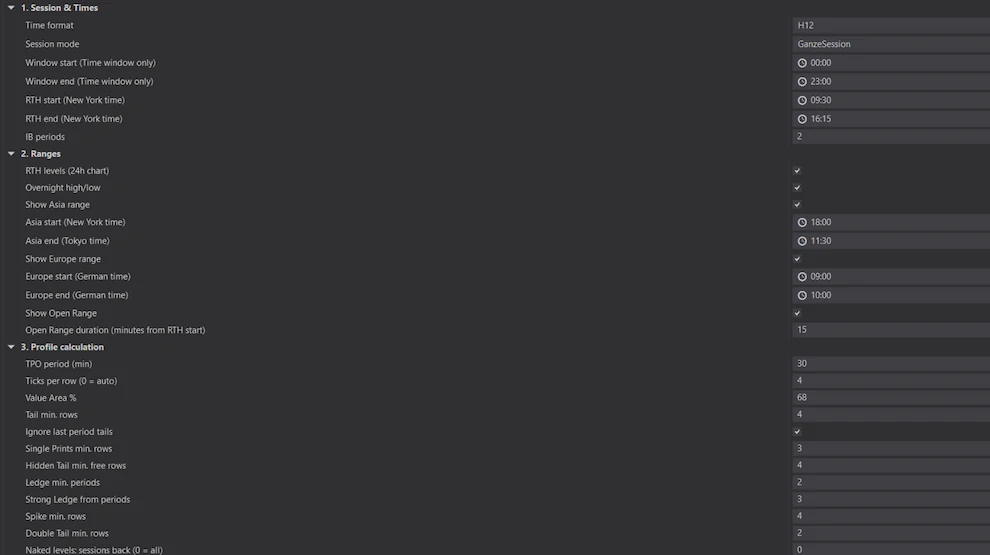 📷 ASPTPO settings in NinjaTrader 8: session, RTH times, ranges and TPO period
4. Daily pre-open workflow
- Classify yesterday: trend day or rotational day? Where are POC, VAH, VAL?
- Note open zones: tails, hidden tails, ledges, poor highs/lows from recent days that haven't been resolved.
- Place the overnight: where is the market opening relative to yesterday's value area?
- Define scenarios: what do I do if we open above / inside / below the value area?
By hand this takes 20–30 minutes per market. With ASPTPO the zones and levels are already drawn when the chart loads, bias panel included – what remains are the scenarios, and those belong in your head.
NinjaTrader® is a registered trademark of NinjaTrader Group, LLC. This guide is independent and not authorised by NinjaTrader.